


All Document Center
3.954.00 Reviews
App Specs
- Version
- 1.3.1
- Updated On
- License
- Free
- Downloads
- 1,000,000+
- Developer
- 5660 BA, LLC
- Categories
- Productivity
- Platform
- Android
Screenshots
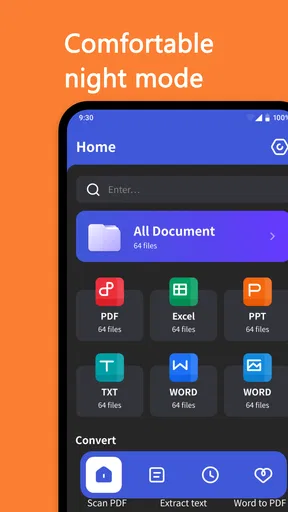
 Analysis by AppCompare
Ever find yourself buried under a mountain of documents, struggling to keep everything organized? Well, that's where All Document Center swoops in to save the day. I recently got my hands on this app and, honestly, it feels like a cluttered-desk lifesaver. Let me take you through my experience with it, step by step.
Who benefits from a document hub?
I can see the appeal for someone who regularly moves between forms, receipts, class notes, and work files on a phone. Instead of treating each document as an isolated download, a central document app can make everyday retrieval less fiddly. The practical test is not how many file types an app claims to handle, but whether it helps you get from “I saved that somewhere” to the right file without wasting time.
A realistic example is preparing for an appointment while away from home. You might need a saved form, a recent bill, and a photo of a receipt. A document center is useful when it lets you gather those items in one place and check them before you leave. For this kind of light personal organization, All Document Center is more relevant than a full office suite, which can bring editing tools you may rarely use.
Trust starts with what you can verify
Documents can contain addresses, signatures, account details, or information about someone else, so I would not judge a file app on convenience alone. Before adding sensitive material, I look for clear explanations of how files are handled, what permissions the app requests, and whether there are visible choices for account access or deletion. Those details matter more than a reassuring label or a polished screen.
I would also separate a feature’s presence from the safeguards around it. A scanner, a search box, or cloud syncing can make work easier, but none of those features by itself tells me who can access a file or how long a copy remains available. My approach is to try the app with a harmless document first, inspect the available settings, and only then decide whether it belongs in a workflow involving private paperwork.
Small habits that make document apps more useful
One useful habit is to name files for the moment you will need them, rather than leaving them with a camera-generated label. “Insurance form” is easier to find than a string of numbers, while adding a year or purpose can distinguish several similar versions. That pays off most when searching on a small screen, where browsing a long folder is tedious.
I would also keep a clean original before changing a document’s format. A converted copy can be convenient to send or view, but retaining the source makes it easier to return to the editable version if a layout shifts. For scans, check the edges and legibility before discarding the paper: a quick review can catch a clipped signature or faint receipt text while the original is still nearby.
Worth Reading Before You Choose

EA SPORTS FC Mobile 26 Is a Bigger Football Game, but It Takes Time

Flipboard Shows What News Apps Must Do Beyond the Feed

Switching to Android Auto Means Rethinking Your Driving Routine

Google Calendar Makes a Crowded Week Easier to Manage

Ludo King Makes the Most of the Minutes Between Plans

Baby Panda World Brings Quick Play to Modern Phones, but Its Game Library Feels Busy
First Impressions: Getting Started with All Document Center
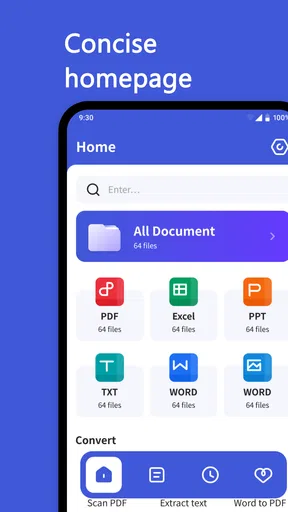
Right off the bat, All Document Center impresses with its clean and intuitive interface. No more headaches trying to find where everything is. You just download it, and you're greeted by a straightforward layout that even a tech newbie could navigate. Installing it was a breeze, and within minutes, I was diving into its features.
For context, this is a free productivity app from 5660 BA, LLC. It has an average rating of 4.1 from around 1,100 ratings, with 19 written reviews, and more than one million installs. It is marked for everyone, was released on July 17, 2025, and the current version is 1.2.1; Android users need version 6.0 or later. Those figures offer a sense of its reach, but they do not replace checking whether its actual controls suit your own privacy needs.
Features That Caught My Eye
What really sets this app apart are its versatile features. Whether you're dealing with PDFs, Word documents, or Excel sheets, this app can handle them all. It's like having a Swiss Army knife for your digital files. One of the standout features is the ability to quickly convert between different document formats. Need to turn a Word doc into a PDF? Done. This kind of flexibility is a game-changer, especially if you're always on the go.
Format conversion is most useful when the recipient needs a file that is easy to open or when you want a stable copy for sharing. I would still check the output before sending it, especially for a spreadsheet with columns or a document with signatures and careful spacing. Conversions can change how a page looks, so a brief visual check is a sensible last step rather than assuming the result is identical to the original.
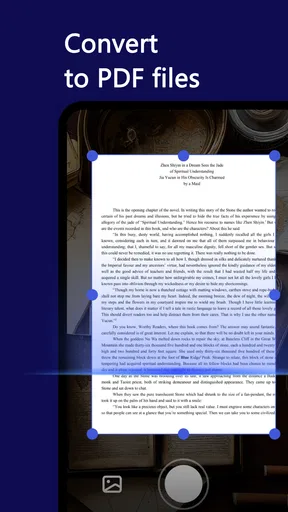
Another feature I loved was the document scanner. It's perfect for those moments when you need to digitize a paper document quickly. I tried it with a few receipts and contracts, and the app accurately captured every detail without a hitch. This scanner is a gem for keeping everything digital and organized.
For a useful scanning routine, place the page on a contrasting, flat surface and review the captured image before moving on. Receipts often have pale print, while contracts may include small text near the margins; both can look fine at a glance but become hard to read later. I would treat a phone scan as a handy working copy, not automatically as a replacement for an original that must be retained.
Usability: A Day in the Life with All Document Center
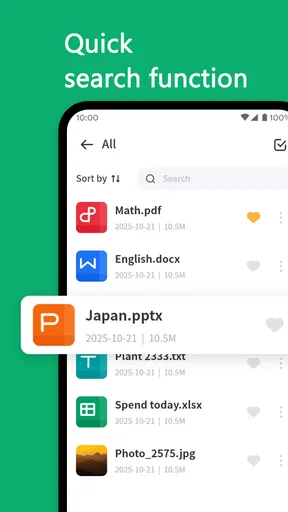
Using All Document Center daily was a smooth experience. The app is designed to be user-friendly, and it shows. Navigating through my files was intuitive, and the search function is incredibly efficient. No more endless scrolling to find what you need. Just type in a keyword, and voila, there it is.
Search works best when your files have distinctive names or searchable text. If a scan is only an image, searching for words inside it may not work the way it does for a text document, so I would not rely on search alone for a pile of unnamed camera captures. A simple naming pattern—document type, person or project, and year—can make the library easier to manage without building an elaborate folder system.
Additionally, the app supports cloud integration, which means you can sync your documents across multiple devices. I found this particularly useful when switching between my phone and tablet. Everything stayed up-to-date, and I didn't have to worry about losing any files in the shuffle.
Cloud access is convenient, but it also changes where a document may be stored and how many devices can reach it. Before syncing private files, I would review the account and storage choices that are actually visible in the app and confirm I am using the intended account on each device. If you only need to carry a few low-risk files, keeping the workflow local may be simpler than syncing a whole archive.
Security: Keeping Your Documents Safe
Security is a big deal when it comes to handling sensitive documents, and this app doesn’t disappoint. It offers robust encryption to ensure your files are protected. I felt reassured knowing my documents were safe from prying eyes, thanks to the app's commitment to security.
For especially sensitive records, I would take a cautious approach and avoid treating any general-purpose document app as a vault without first understanding its privacy settings and account controls. Consider who shares your device, whether notifications could expose a document name, and whether a file needs to be stored in the app at all. A password-protected source or an organization-approved system may be a better fit for medical, legal, or financial records.
Choosing it over familiar alternatives
Compared with using a phone’s basic file browser, a document-focused app can be more convenient when scanning, finding, and converting paperwork are regular tasks. A file browser may be enough if you mainly need to move downloads between folders and already have a reliable naming routine. A dedicated PDF reader is often the better choice if your main work involves annotating, signing, or carefully reviewing long PDFs; a full office suite makes more sense when you need substantial editing rather than quick document handling.
I would choose this app for a mixed, everyday collection where quick access matters more than advanced document production. I would skip it if my priority were a tightly managed business archive, complex collaboration, or detailed control over retention and access. In those situations, a tool chosen and managed by an employer or institution is usually a safer match than a personal organizer.
Support and Community: You're Not Alone
If you ever run into any issues, the support team is just a click away. I had a couple of questions during my initial setup and received prompt and helpful responses. Plus, there’s a thriving community of users who share tips and tricks, which is a great resource for getting the most out of the app.
When something goes wrong, I would first check whether the issue is with the file itself: try opening the original in another trusted viewer, or compare it with the converted copy. That helps distinguish an app problem from a damaged file or a conversion change. For anything involving access to private documents, avoid sharing the document itself in a support request unless you are comfortable with that; describing the steps and error is often enough to begin troubleshooting.
Wrapping Up: My Final Thoughts on All Document Center
All in all, All Document Center is a powerhouse app that has significantly streamlined my digital document management. It’s packed with features that cater to both casual users and hardcore document junkies. Whether you're a student, a business professional, or just someone trying to keep your life organized, this app is worth checking out. It's like having a personal assistant in your pocket, keeping everything neat and tidy.
My recommendation is more measured for readers with sensitive or work-managed files: start with ordinary documents, test the workflow, and inspect the choices around permissions, accounts, and syncing before relying on it for anything consequential. That small trial tells you more than a feature list can about whether the app fits your habits and comfort level.
If you're tired of document chaos, give All Document Center a shot. It might just be the organizational tool you never knew you needed.
Pros
- Comprehensive document support.
- User-friendly interface.
- Cloud integration available.
- Offline access to files.
- Regular updates and support.
Cons
- Occasional syncing issues.
- Ads in free version.
- Limited features without subscription.
- Requires internet for full functionality.
- Some features can be complex.
FAQs for All Document Center
What is All Document Center and what features does it offer?
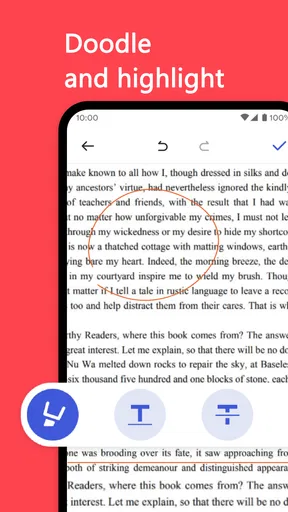
All Document Center is a comprehensive app designed for managing, editing, and viewing various document types, including PDFs, Word, Excel, and more. It offers features like document scanning, editing tools, cloud integration, and secure file sharing. Users can also annotate documents and convert them between different formats, making it a versatile tool for both personal and professional use.
Is All Document Center available on both Android and iOS devices?
Yes, All Document Center is available for download on both Android and iOS platforms. The app is optimized for seamless performance across various devices, including smartphones and tablets. This ensures that users can access and manage their documents on the go, regardless of the operating system they use.
Does All Document Center require an internet connection to function?
While an internet connection enhances the app's functionality, particularly for cloud storage and sharing features, All Document Center can perform many tasks offline. Users can view and edit documents without internet access, making it convenient for use in areas with limited connectivity. However, syncing files to the cloud requires an active internet connection.
Is my data secure when using All Document Center?
All Document Center prioritizes user data security by implementing robust encryption methods for both stored and shared documents. Users can also set passwords on sensitive files to enhance privacy. Regular updates ensure that the app adheres to the latest security standards, safeguarding your documents against unauthorized access.
Are there any subscription fees or in-app purchases in All Document Center?
All Document Center offers both free and premium versions. The free version includes basic features, while the premium version unlocks advanced functionalities such as enhanced editing tools and additional cloud storage options. Users can opt for a subscription model to access these premium features, ensuring they only pay for what they need.


